Dvorak for Developers
Eight years later and I'm still using Dvorak. The speed gains have held up, and I've never regretted the switch. The Vim remapping approach I describe here is still what I use.
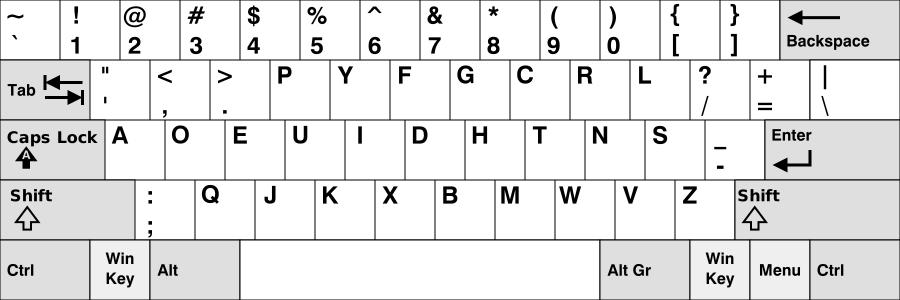 Dvorak Keyboard layout (Source: Wikipedia)

Four years ago, I switched my keyboard layout to Dvorak. I did it because it sounded like it would not only be easier to use, but also make me a faster typist. I’ve read multiple accounts of various software engineers that did not experience significant improvements when they switched to Dvorak, but this post is meant to be a counterexample to those naysayers.
Starting Out
The way that I learned Dvorak is not the methodology that I would (initially) recommend to anyone. I switched my computer to Dvorak and quit QWERTY cold-turkey. This meant that when I first switched the keyboard layout on my laptop and was laughable bad, I had no recourse. I never switched over to QWERTY for a few moments to pound out angry response to DogLover88’s uninformed critique of Obama’s presidency. My hubris was most poignantly demonstrated the first time I logged out of my computer after switching to Dvorak. As I only later realized that I couldn’t actually type my password in to log back in.
For weeks, I struggled through writing papers and engaging in conversations with my friends online. My journal entries became spartan and concise to save myself the strain of having to type too much, but eventually…things got better.
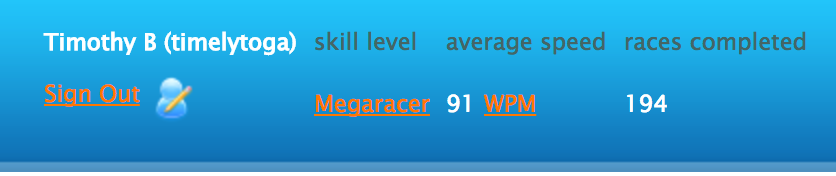 My stats according to Typer Racer (my favorite typing speed site)
At the time of writing, I am in 96.5% percentile at an average of 91 wpm. I know there are many people that are faster typists than me already on QWERTY, but my max typing speed for QWERTY was 71 wpm while it is 113 for Dvorak. Not to extrapolate my anecdotal experience to everyone, but I certainly experienced a marked improvement in my typing speed since moving.
Writing Code with Dvorak
I personally find the layout of most commonly used programming punctuation marks to be more reasonably positioned on a Dvorak keyboard. This is because some of the most commonly used programming punctuation marks <“,.’> are accessible with the left hand, while the remaining /?+={}[]()-_\| are on the right side. This distribution of marks is extremely helpful when writing long Java-esque trains of object / method trains and when writing C++ with lots of namespace modifications. For example:
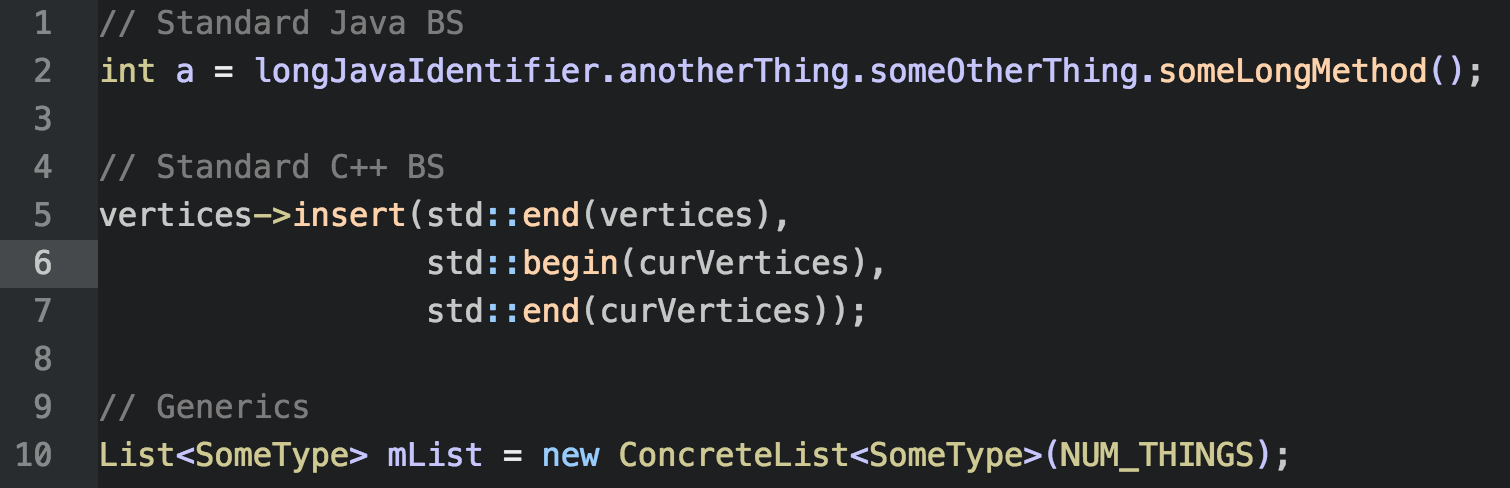 Code that Dvorak should help you type faster
To see what I mean, take another look at the keyboard layout and look at the punctation marks that are commonly used in programming on either side of the board:
Dvorak Keyboard layout (Source: Wikipedia)
Because the necessary punctuation marks are split between both of your hands, it is easier to type many of the most common blocks of code. Less time getting the code you want to write on the screen means that your coding flow is just that much quicker.
Using Vim
Lots of people are concerned that Vim would become unusable if you used anything other than the standard QWERTY keyboard, but that simple isn’t the case. I have remapped the standard movement keys / action keys to the home row as it was intentioned with QWERTY. I have my .vimrc file on GitHub here if you would like to check out how I make things easier for myself.
Learning Dvorak
If you are employed full-time as a software-developer then it certainly isn’t reasonable to quit QWERTY cold-turkey and switch your work computer to Dvorak. It takes time to master Dvorak, so I recommend developers to start by switching their personal computer first. After a few months of practice at home, I would think you are competent enough to make the switch at work.
As Vincent Jousse writes (with some mild contextual editting) in Vim for Humans,
“This is your last chance: if you are not ready to force yourself to not do quit QWERTY, Dvorak is not for you.”
At some point you have to resign yourself to being slower than you are used to for a temporary period in order to improve your work speed later in the process.
Quirks + Tips
I remapped spotlight search on my Mac to ⌥⌘+S so that I can quickly switch between keyboard layouts with ⌘+Space. This is normally only needed whenever someone needs to borrow my computer, or I’m playing a game that doesn’t detect your keyboard layout.
Additionally, I frequently make use of the “Pinyin-Simplified” Chinese language input which I was originally worried would only work with the QWERTY layout. But thankfully on OSX and Windows, Pinyin input uses the keyboard layout that you last employed to input Chinese characters. So it is trivial to write Chinese using the keyboard layout that I’m most comfortable with (Dvorak).